
Is there a difference between the merchant field merchantCategory and the offer field categoryName?
merchantCategory and the offer field categoryName?Yes, there is a difference. merchantCategory is a high-level category whereas categoryName could be considered a sub-category. categoryName is intended to be used as tags by which a search engine can narrow down the results. A merchant may have only one category (eg Dining), whereas the offers may have multiple categoryNames (eg. ‘Bistro’ and ‘French)’. See this page for a list of the values for merchantCategory and categoryName.
What is the isValidMID flag used for?
isValidMID flag used for?The OFFER will have an isValidMID flag (boolean). If this flag is FALSE it indicates that one or more MIDs for that merchant/locations is no longer valid.
You will need to check the isValidMID flag on each of the locations to determine whether the MID at that location has a problem. If a Location does not have its own MID (eg the locationMID field is empty) then check the isValidMID flag on the merchant.
Background: A MERCHANT is a parent to OFFER(s) and LOCATION(s). A LOCATION can also be a parent to OFFERs.
Both MERCHANTS and LOCATIONS can have MIDs. A LOCATION will either: (a) have its own MID or (b) inherit its MID from the merchant.
As MIDs may become invalid during their lifecycle (eg. merchant changes POS terminals), we will include an isValidMID flag on both the MERCHANT and LOCATION.
To save you the effort of having to parse each LOCATION record (and potentially the MERCHANT record too) every time you pull an OFFER, we have also placed an isValidMID flag on the OFFER – this will act as a sentinel, indicating whether the MID is verified for each LOCATION that the OFFER is available at.
Note: This functionality is pending deployment to our SANDBOX environment
Where can I find the object definitions for Offer, Merchant, Transaction etc.?
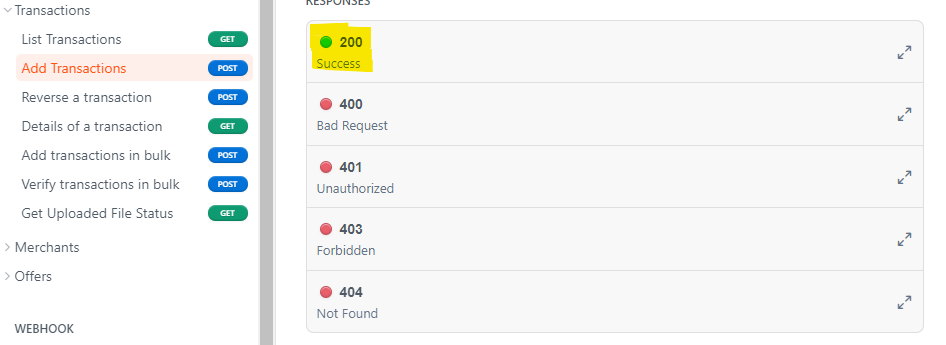
All these object definitions are available under the ‘Responses’ section of each API. Click on the 200 Success (as per snippet below) and a pop up opens with the list of properties.
Can I get a list of all the merchant categories?
Both merchants and offers have categories. merchantCategory is a high-level category whereas categoryName could be considered a sub-category. categoryName is intended to be used as tags by which a search engine can narrow down the results. A merchant may have only one category e.g. Dining, whereas the offers may have multiple categoryNames e.g. ‘Bistro’ and ‘French’.
See this page for a list of the values for merchantCategory and categoryName.
Our APIs expose an ID for the merchantCategory instead of the value. This is to facilitate mapping to an appropriate category in your system.
Is offer category name same as merchant category for that offer?
No, they are different. We have 150+ offer categories. Eg. Accounting, African, Airport, American, Amusement Park, Aquarium, Argentinean, Art Gallery, Asian Fusion, Atm.
As mentioned earlier, categoryName is intended to be used as tags by which a search engine can narrow down the results.
What is a MID under merchant section? Who sets the MID?
A MID is the Merchant Identifier associated with each merchant’s POS terminal and it is how we identify which merchant the transaction has occurred at. When you post a transaction we require the MID and we will subsequently bill the merchant associated with that MID. As part of onboarding merchants into our platform, we will obtain their MID and provide it to you via our merchants API.
Note that both merchants and locations can have MIDs. A location will either: (a) have its own MID or (b) inherit its MID from the merchant.
Should we consider only the offers where isValidMID set to true? What is the process to validate the MID?
isValidMID set to true? What is the process to validate the MID?When publishing offers you should consider whether the isValidMID flag is set to true, but it can be more sophisticated based upon how your system operates.
We have a number of mechanisms to validate MIDs, including performing transactions at merchants in order to capture the MID.
What is the difference between the merchant name and trading name? Are they almost always different from one another?
Merchants frequently have a Trading name different from their registered name. In our Merchants API, we use the Trading name.
Are offers generally limited to specific merchant locations? Should we expect only the eligible merchant locations in the response or is it a list of all the locations?
A merchant may have multiple offers and/or multiple locations. Each offer may be available at any one (or more) of the merchant’s locations (i.e an offer does not have to be available at all locations).
In our merchants API, all offers are listed and each offer will specify which locations it is mapped to.
Similarly, our merchants API also lists all locations, and each location will specify which offers it is mapped to.
Do you have any display/presentation guidelines that we need to be aware of?
No, not at this stage. How you present data to your customers is up to you, although this may change in future as we adapt to meet the needs of our various partners.
We do however have some guidelines/suggestions on how to use our data.
For example, a merchant have one or more locations (a parent-child relationship). Some fields are available on both the location and merchant (such as MID and Description):
- If the MID is present on the location then use that value, otherwise use the MID of the merchant.
- If the locationDescription is present then use that value, otherwise use the description of the merchant.
What does the status Open/Close mean for a merchant? Does it mean if the store is open for that particular moment or more of where that store is in business or not?
It means a store is open at that particular moment. A status of Open indicates the time during which the location is open. A status of Close means that the location is closed for the day and the From and To times can be ignored.
Note: We plan to remove the time fields from the response for closed instances – we will give you plenty of notice before we make this (or any) change.
What kind of validation is done on the merchant images?
We have some limitations placed on image sizes and file types. Images must be png or jpeg. Logos must no more than 2MB. Business images must be no more than 5 MB.
At present we are building up the content base and visually check the quality of all images. In future, we intend for merchants to be able to self-serve and so they will be able to upload/change images which may not go through the same manual checks.
What is a locationReferenceIdentifier for a merchant location?
It is a unique identifier for a location but does not have any significance.
What are all the possible values for offerTypeName?
At present, the only values are ‘Cashback’ or ‘Cashback Boosted’. The latter is used to indicate offers that are valid only at certain times (e.g. Every Tuesday night from 5pm-9pm).
What are the different values for offer status and how do we use them?
- Active – Currently active
- Scheduled – Offer is yet to start. You may decide to expose details of upcoming offers to customers (eg. there may be a special offer for Mothers Day at Cirque restaurant, that will only be valid on the day, but guests will need to book a table in advance so will need to know about it ahead of time)
- Expired – Offer has ended. The expiry of an offer is tied to the offer end date - once the end date passes, the offer is expired. The offer end date may be changed at any time by the merchant, albeit with a 7 day grace period during which time the offer is still active.
Are all the offers native cash back, card linked offers?
Yes, at present this is true. In future we may introduce other types.
What does the rate field in offer mean?
The rate is the percentage of the transaction amount that we will pay to our partner. It is this that funds the cashback/reward to be passed on to the customer.
MappedLocations is a list. Does it mean that offers are eligible only for those locations or any location for the merchant?
Only on those locations
Are offer images always different from merchant images?
A merchant will generally have images whereas they will rarely have offer images. The intention is that the images would be different, although this is not (currently) enforced.
Are offers restricted to particular SKU?
No. At present, the offer applies to any transaction at the merchant. In future, we may introduce SKU functionality into the platform.
Are all the offers going to be cashback type or would there be a mix of coupon offers as well?
As part of the Seamless Rewards program, we will only be providing cashback offers.
Note. Coupons are used for Show&Go types offers (show your coupon and then redeem the discount) and are not applicable to cashback offers.
How frequently are the offers updated?
At present, this is rarely done, although this will likely change as use of Card Linked Offers increases.
To simplify offer management for you, we do not allow offers to change except for changing the offer end date. If a merchant wants to change an existing offer, they will need to deactivate the current offer and create a new offer. If an offer is deactivated, its end date is set to 7 days later. This means the offer remains active for 7 days, giving you time to let your customers know that an offer is set to expire soon.
Are the updates only available via webhooks?
Webhooks are the only way the platform communicates with our partners when an update happens. Alternatively, our partners can call our API regularly to check for updates.
What is mechanism of billing the merchants for cashback?
Our CLO platform bills and collects the cashback amounts from the merchants regularly.
Note that the collection of funds from the merchant is independent from payments to our partners. Payments to our partners are made on a monthly basis, regardless of whether we have collected the funds from the merchants. i.e. once a transaction is posted to our platform and we respond stating that it was validated (denoted by isSuccess=true in the API response) we guarantee the funds.
How are merchants notified about the redemption of an offer?
Merchants are not notified on a transaction-by-transaction basis. Merchants have access to a portal where they can log in at any time to see the transactions that have occurred at their establishment.
Also, when a merchant invoice is generated the merchant is emailed a copy of it – the email includes a link to the portal where they can log in to see the individual transactions.
What is the process for reversal of transactions?
If the transaction is subsequently reversed (eg. the customer returns the goods and gets a refund) the original transaction can be reversed by calling the reverse API (this posts a second transaction but with a negative value).
How long after the offer has expired, we can continue to give out cashback? Sometimes transactions are cleared only days later or there may be operational issues that delay the redemption.
The transaction is considered valid if it occurred during the ‘active’ period of the offer. Even if the transaction is reported to us after the offer has expired, we will check if the date and time of the transaction was within the offer period.
As mentioned above, when an offer is deactivated, there is a 7 day grace period during which the offer will remain active. Any transactions performed during the 7 day grace period will be honoured.